Actions
Button
Triggers an action, with consistent variants, sizes and states.
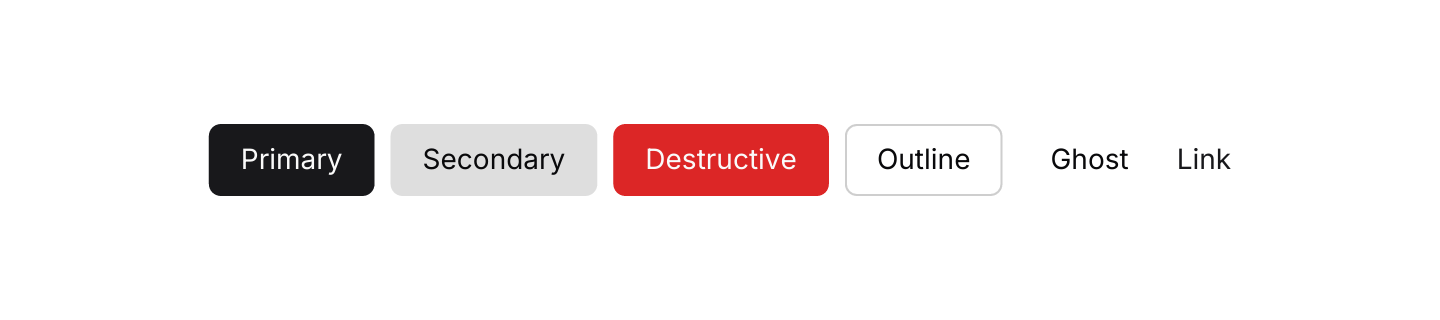
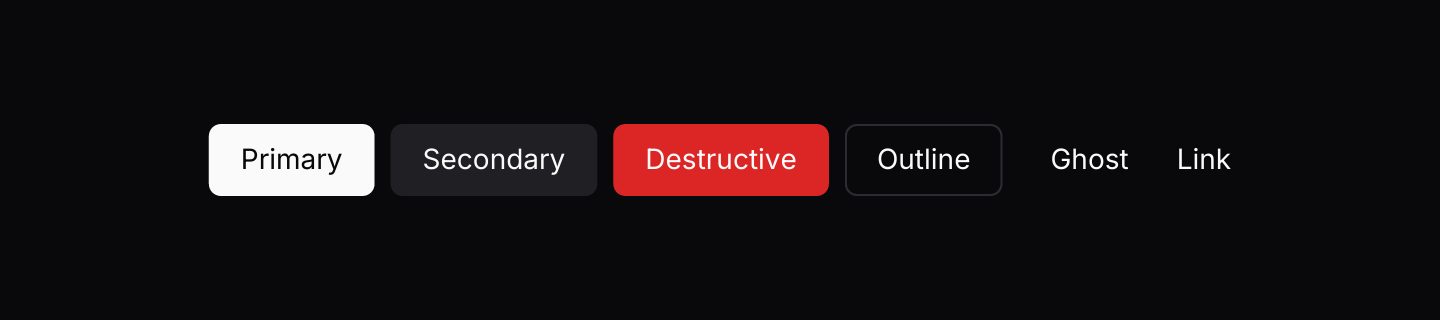
Static preview
use iced::Element;
use iced::widget::row;
use iced_cube::button;
use iced_cube::primitives::button::Variant;

#[derive(Debug, Clone)]
pub enum Message {
    Pressed(Variant),
}

#[derive(Debug, Default)]
pub struct Example {
    last: Option<Variant>,
}

impl Example {
    pub fn update(&mut self, message: Message) {
        let Message::Pressed(variant) = message;
        self.last = Some(variant);
    }

    pub fn view(&self) -> Element<'_, Message> {
        row(Variant::ALL.map(|variant| {
            button(format!("{variant:?}"))
                .variant(variant)
                .on_press(Message::Pressed(variant))
                .into()
        }))
        .spacing(8)
        .wrap()
        .into()
    }
}Usage
Use one primary button per view for the main action, and secondary, outline or ghost buttons for everything else. Destructive buttons are for actions that delete or cannot be undone.
For a button that shows only an icon, such as a toolbar toggle or a close button, use Icon Button.
Icons come from Lucide through the lucide! macro, which resolves the icon at compile time so only the icons you use are included in your binary.
Examples
Sizes
Small, medium and large, plus the square icon size.


Static preview
use iced::widget::row;
use iced::{Alignment, Element};
use iced_cube::primitives::button::Size;
use iced_cube::{button, icon_button, lucide};

#[derive(Debug, Clone)]
pub enum Message {
    Pressed,
}

#[derive(Debug, Default)]
pub struct Example;

impl Example {
    pub fn update(&mut self, _message: Message) {}

    pub fn view(&self) -> Element<'_, Message> {
        row![
            button("Small").size(Size::Sm).on_press(Message::Pressed),
            button("Medium").size(Size::Md).on_press(Message::Pressed),
            button("Large").size(Size::Lg).on_press(Message::Pressed),
            icon_button(lucide!(ArrowUpRight)).on_press(Message::Pressed),
        ]
        .spacing(8)
        .align_y(Alignment::Center)
        .into()
    }
}With icon
Lucide icons before or after the label.


Static preview
use iced::Element;
use iced::widget::row;
use iced_cube::primitives::button::Variant;
use iced_cube::{button, lucide};

#[derive(Debug, Clone)]
pub enum Message {
    Pressed,
}

#[derive(Debug, Default)]
pub struct Example;

impl Example {
    pub fn update(&mut self, _message: Message) {}

    pub fn view(&self) -> Element<'_, Message> {
        row![
            button("New branch")
                .icon(lucide!(GitBranch))
                .on_press(Message::Pressed),
            button("Continue")
                .trailing_icon(lucide!(ArrowRight))
                .variant(Variant::Outline)
                .on_press(Message::Pressed),
            button("Delete")
                .icon(lucide!(Trash))
                .variant(Variant::Destructive)
                .on_press(Message::Pressed),
        ]
        .spacing(8)
        .wrap()
        .into()
    }
}Enabled and disabled
A button without a message renders disabled.


Static preview
use iced::widget::{column, row, text};
use iced::{Alignment, Element};
use iced_cube::primitives::button::Variant;
use iced_cube::{button, lucide};

#[derive(Debug, Clone)]
pub enum Message {
    Increment,
    Reset,
}

#[derive(Debug, Default)]
pub struct Example {
    count: u32,
}

impl Example {
    pub fn update(&mut self, message: Message) {
        match message {
            Message::Increment => self.count += 1,
            Message::Reset => self.count = 0,
        }
    }

    pub fn view(&self) -> Element<'_, Message> {
        let reset = (self.count > 0).then_some(Message::Reset);

        column![
            text(format!("Pressed {} times", self.count)).size(14),
            row![
                button("Press me")
                    .icon(lucide!(Plus))
                    .on_press(Message::Increment),
                button("Reset")
                    .variant(Variant::Secondary)
                    .on_press_maybe(reset),
            ]
            .spacing(8),
        ]
        .spacing(12)
        .align_x(Alignment::Center)
        .into()
    }
}API
| Item | Description |
|---|---|
button(label) | Creates a text button. It renders disabled until it has a message. |
.variant(Variant) | Primary, Secondary, Destructive, Outline, Ghost or Link. Defaults to Primary. Link has no side padding, so it lines up with nearby text. |
.size(Size) | Sm, Md or Lg. Defaults to Md. The square Icon size is deprecated; use icon_button instead. |
.icon(glyph) / .trailing_icon(glyph) | Adds a Lucide icon before or after the label. |
.on_press(message) / .on_press_maybe(option) | Sets the message emitted on press. None disables the button. |
.width(length) | Overrides the width. Buttons shrink to fit by default. |