Overlays
Dialog
A modal window over a dimmed scrim, for a focused task or a confirmation.
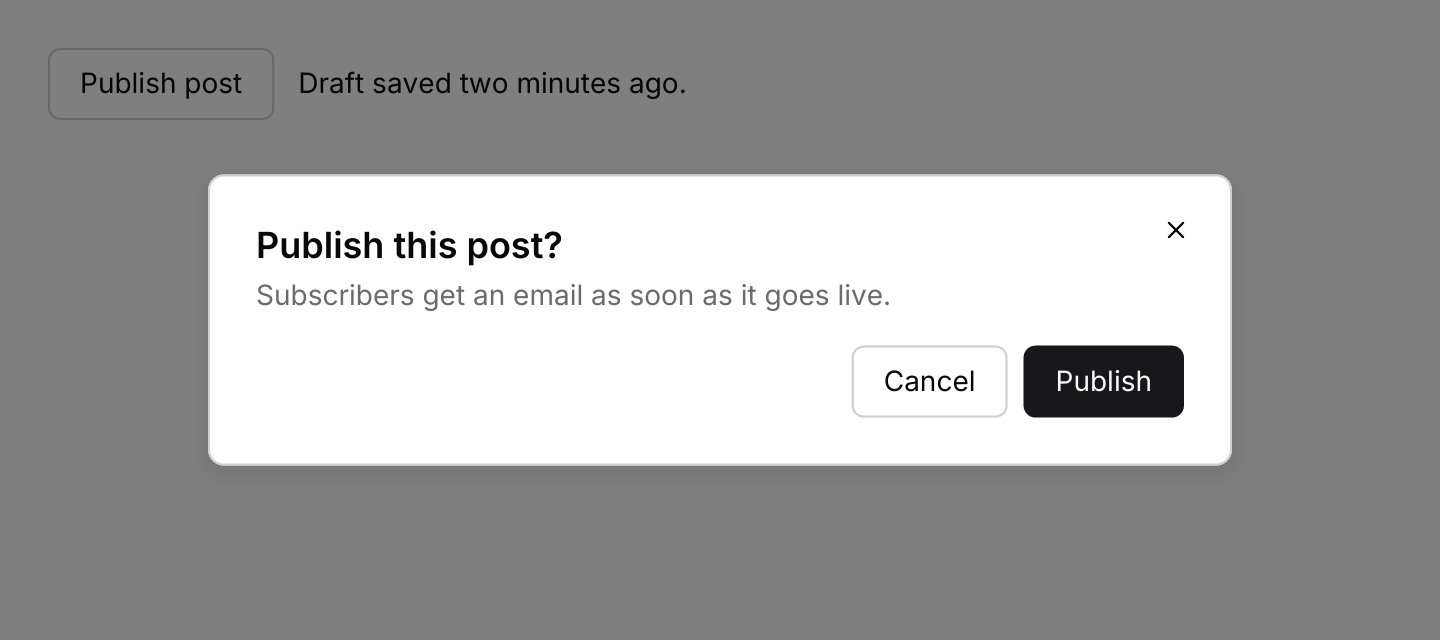
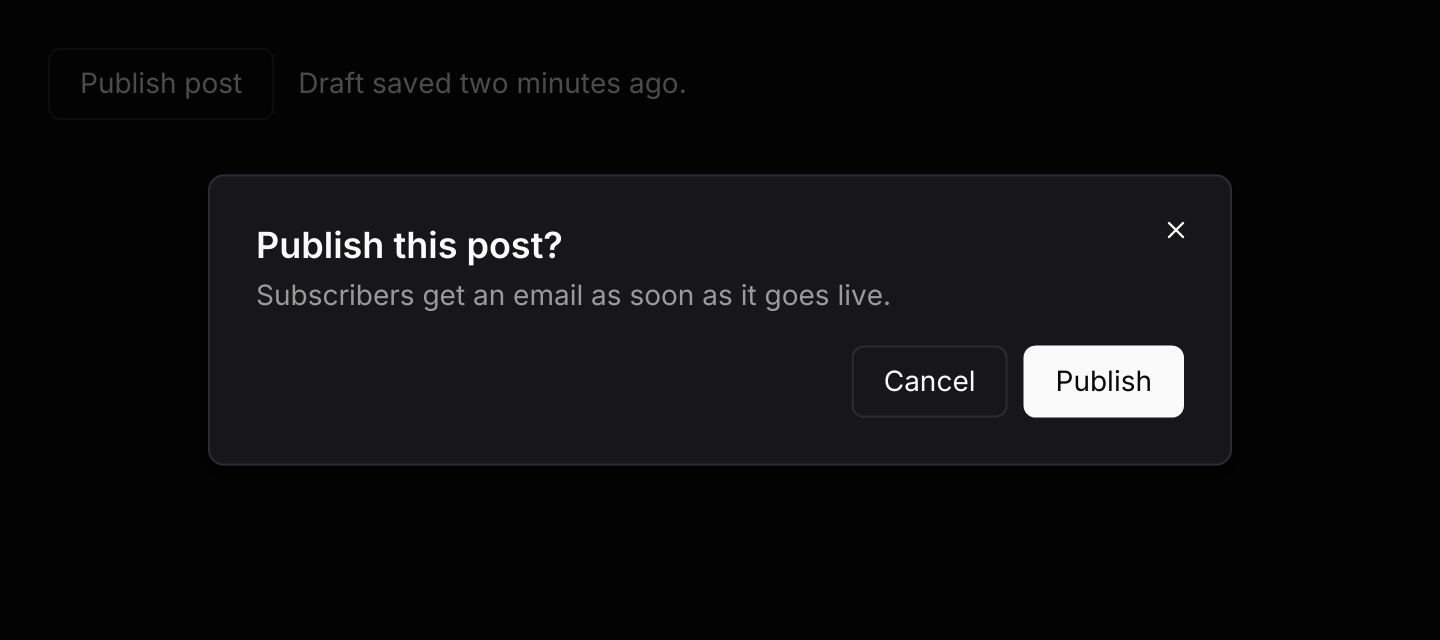
use iced::widget::{container, row, text};
use iced::{Alignment, Element};
use iced_cube::button;
use iced_cube::overlay::dialog::dialog;
use iced_cube::primitives::button::Variant;

#[derive(Debug, Clone)]
pub enum Message {
    Open,
    Close,
    Publish,
}

#[derive(Debug)]
pub struct Example {
    open: bool,
    published: bool,
}

impl Default for Example {
    fn default() -> Self {
        Self {
            open: true,
            published: false,
        }
    }
}

impl Example {
    pub fn update(&mut self, message: Message) {
        match message {
            Message::Open => self.open = true,
            Message::Close => self.open = false,
            Message::Publish => {
                self.published = true;
                self.open = false;
            }
        }
    }

    pub fn view(&self) -> Element<'_, Message> {
        let status = if self.published {
            "The post is live."
        } else {
            "Draft saved two minutes ago."
        };
        let base = row![
            button("Publish post")
                .variant(Variant::Outline)
                .on_press(Message::Open),
            text(status).size(14),
        ]
        .spacing(12)
        .align_y(Alignment::Center);

        dialog(container(base).padding(24))
            .open(self.open)
            .title("Publish this post?")
            .description("Subscribers get an email as soon as it goes live.")
            .action(
                button("Cancel")
                    .variant(Variant::Outline)
                    .on_press(Message::Close),
            )
            .action(button("Publish").on_press(Message::Publish))
            .on_dismiss(Message::Close)
            .into()
    }
}Usage
Wrap the root of your view in dialog, so the scrim covers the whole window. While the dialog is open, the content underneath still draws but gets no clicks, hover or key presses. It keeps its widget state, such as scroll positions, when the dialog opens and closes.
Use a dialog for a short task that needs attention before people go back to what they were doing. For a destructive confirmation, use alert_dialog: it has no close button and ignores clicks on the scrim, so the only ways out are Cancel, Escape or the destructive action. Enter does nothing in it by default, because a key press meant for something else should never delete anything; turn it on with .confirm_on_enter(true) when the action is easy to undo. Turn Escape off with .dismiss_on_escape(false) when even that is too easy.
Keyboard users answer an alert dialog with Tab: nothing is focused when it opens, the first Tab rings Cancel, the next rings the destructive action, and Enter or Space presses the ringed button. Shift+Tab goes back, and a click anywhere clears the ring. To confirm with a single chord instead, bind one to Action::Confirm in the keymap and turn on .confirm_on_enter(true).
The dialog handles its own keys, so it needs no subscription. When it opens, it focuses its first text field and unfocuses anything underneath. Tab and Shift+Tab then move between the text fields inside it and wrap at either end, so focus never leaves the dialog. It captures every key press its content leaves, so app-wide shortcuts from keys::subscription cannot change tabs, sliders or menus behind the scrim. Let a chosen shortcut through with .pass_through(...).
Menus, comboboxes and command lists inside a dialog get keys and clicks first. Escape or a click on the scrim closes an open menu or list and leaves the dialog open; the next one closes the dialog. The command palette example puts a command list in a dialog.
Some limits come from iced 0.14 itself:
- Only text fields, text editors and an alert dialog’s own two buttons can take keyboard focus. Tab skips the buttons you pass to
.action(...), so Space cannot press them. Set.on_confirm(...)so Enter runs the main action, or give a field anon_submitof its own. - A focused text field takes the first Escape to lose focus, so it takes a second Escape to dismiss the dialog.
- There is no screen reader support, so the dialog’s title and description are not announced.
Examples
Form and keyboard
Fields inside a small dialog. Tab and Shift+Tab move focus between them through the default keymap, without leaving the dialog, and Enter saves through on_confirm.
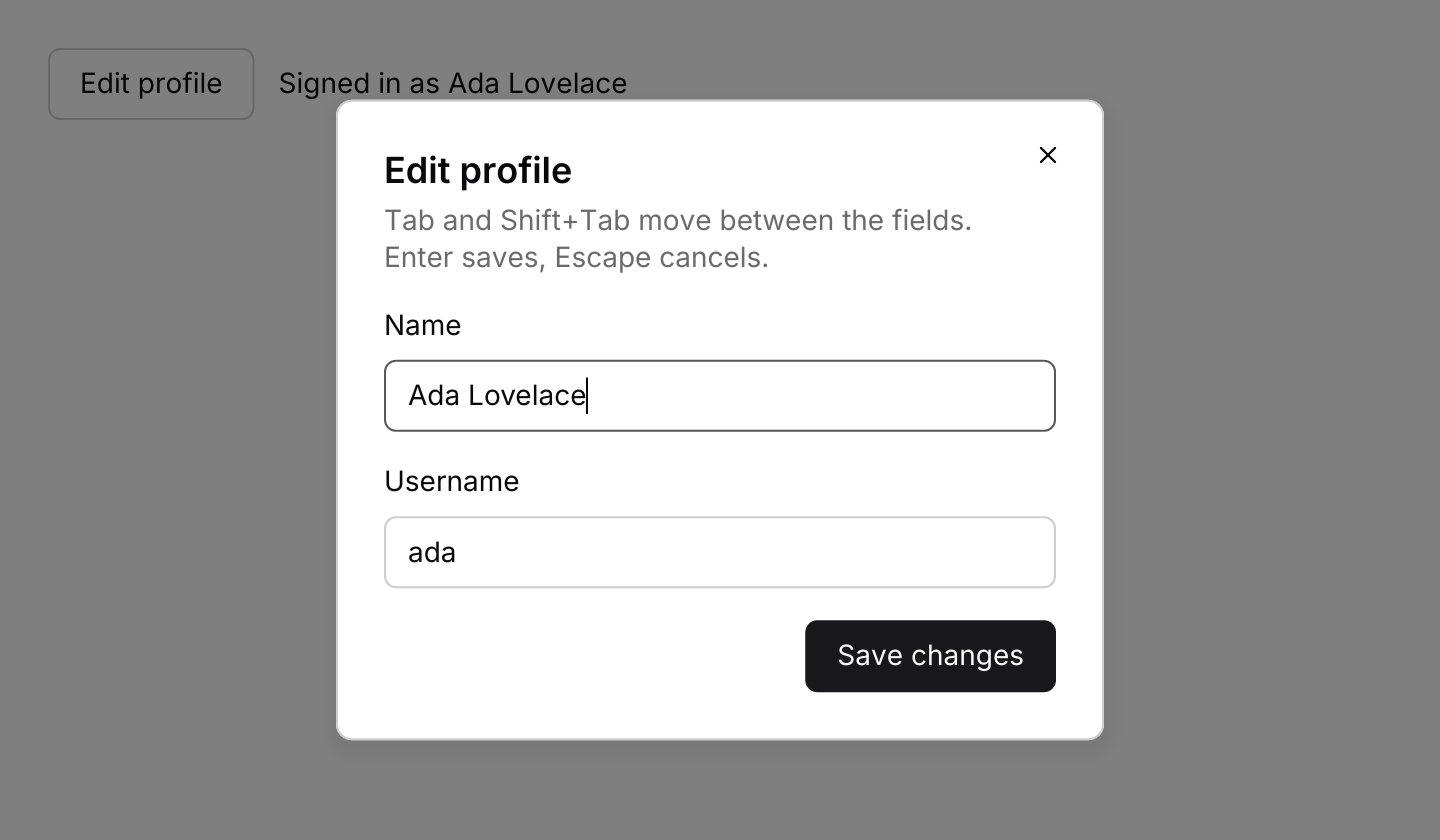
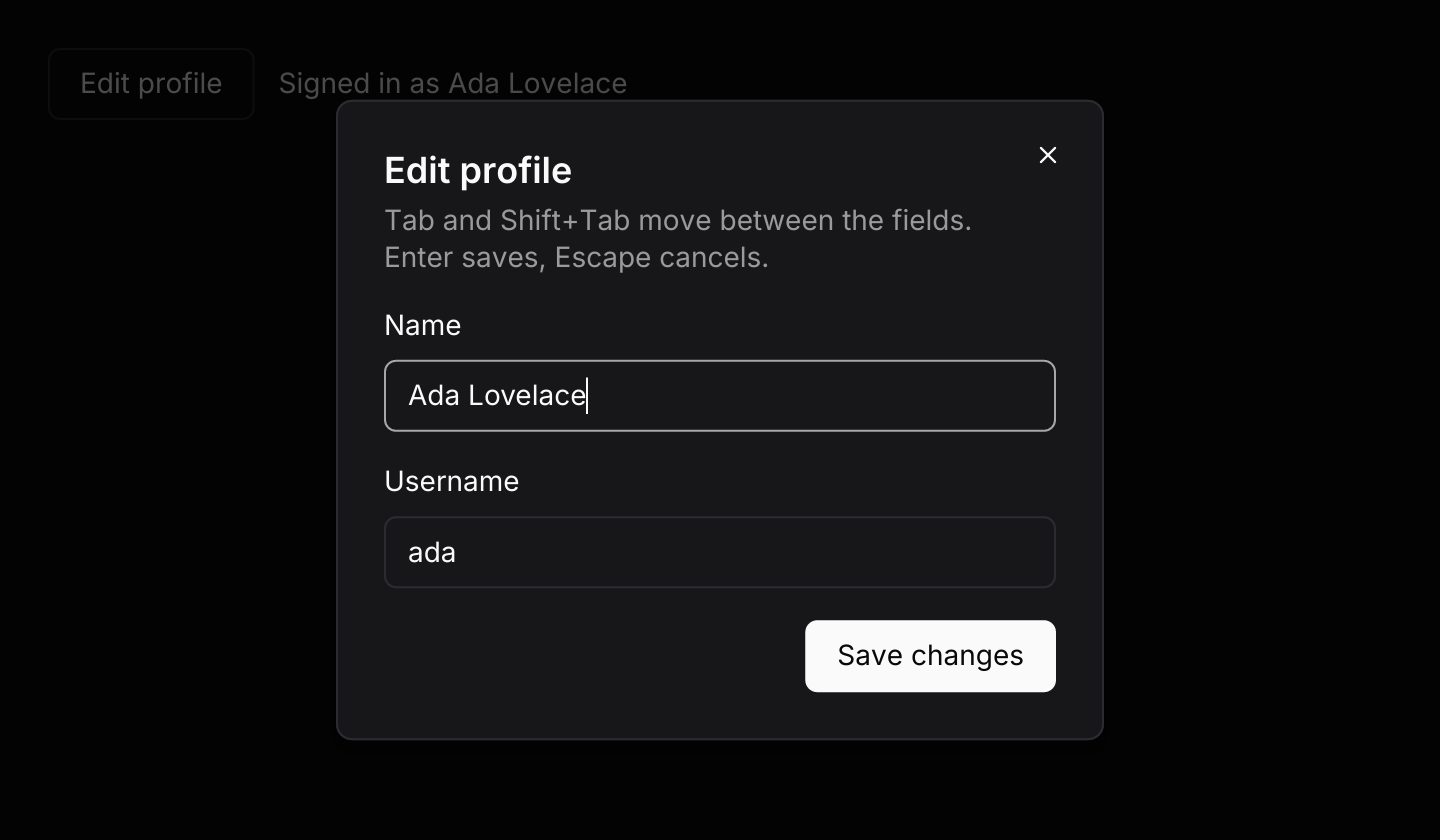
use iced::widget::{column, container, row, text};
use iced::{Alignment, Element};
use iced_cube::overlay::dialog::{Size, dialog};
use iced_cube::primitives::button::Variant;
use iced_cube::{button, field, input};

#[derive(Debug, Clone)]
pub enum Message {
    Open,
    Close,
    NameChanged(String),
    UsernameChanged(String),
    Save,
}

#[derive(Debug)]
pub struct Example {
    open: bool,
    name: String,
    username: String,
    saved: String,
}

impl Default for Example {
    fn default() -> Self {
        Self {
            open: true,
            name: String::from("Ada Lovelace"),
            username: String::from("ada"),
            saved: String::from("Ada Lovelace"),
        }
    }
}

impl Example {
    pub fn update(&mut self, message: Message) {
        match message {
            Message::Open => self.open = true,
            Message::Close => {
                self.name = self.saved.clone();
                self.open = false;
            }
            Message::NameChanged(name) => self.name = name,
            Message::UsernameChanged(username) => self.username = username,
            Message::Save => {
                self.saved = self.name.clone();
                self.open = false;
            }
        }
    }

    pub fn view(&self) -> Element<'_, Message> {
        let base = row![
            button("Edit profile")
                .variant(Variant::Outline)
                .on_press(Message::Open),
            text(format!("Signed in as {}", self.saved)).size(14),
        ]
        .spacing(12)
        .align_y(Alignment::Center);

        let form = column![
            field(
                "Name",
                input("Your name", &self.name).on_input(Message::NameChanged),
            ),
            field(
                "Username",
                input("username", &self.username).on_input(Message::UsernameChanged),
            ),
        ]
        .spacing(16);

        dialog(container(base).padding(24))
            .open(self.open)
            .title("Edit profile")
            .description("Tab and Shift+Tab move between the fields. Enter saves, Escape cancels.")
            .body(form)
            .action(button("Save changes").on_press(Message::Save))
            .on_confirm(Message::Save)
            .on_dismiss(Message::Close)
            .size(Size::Sm)
            .into()
    }
}Destructive confirmation
An alert dialog with Cancel and a destructive action. Enter confirms, Escape cancels and clicking the scrim does nothing.
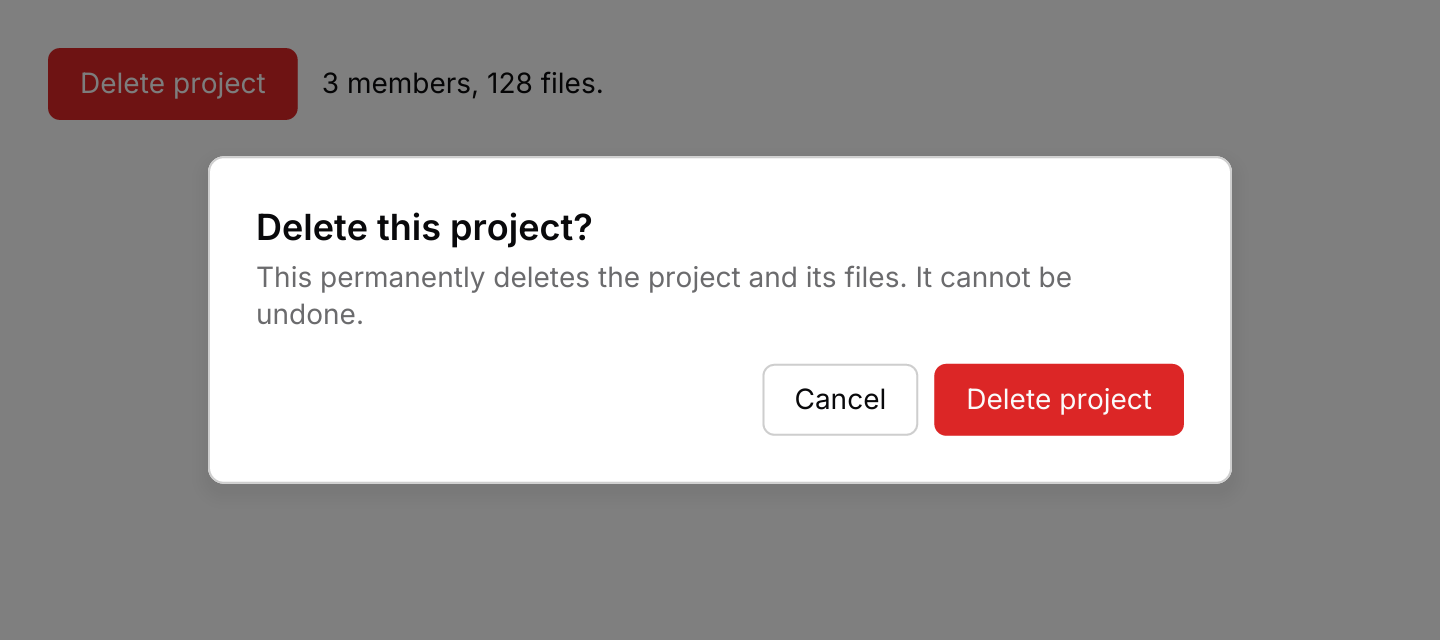
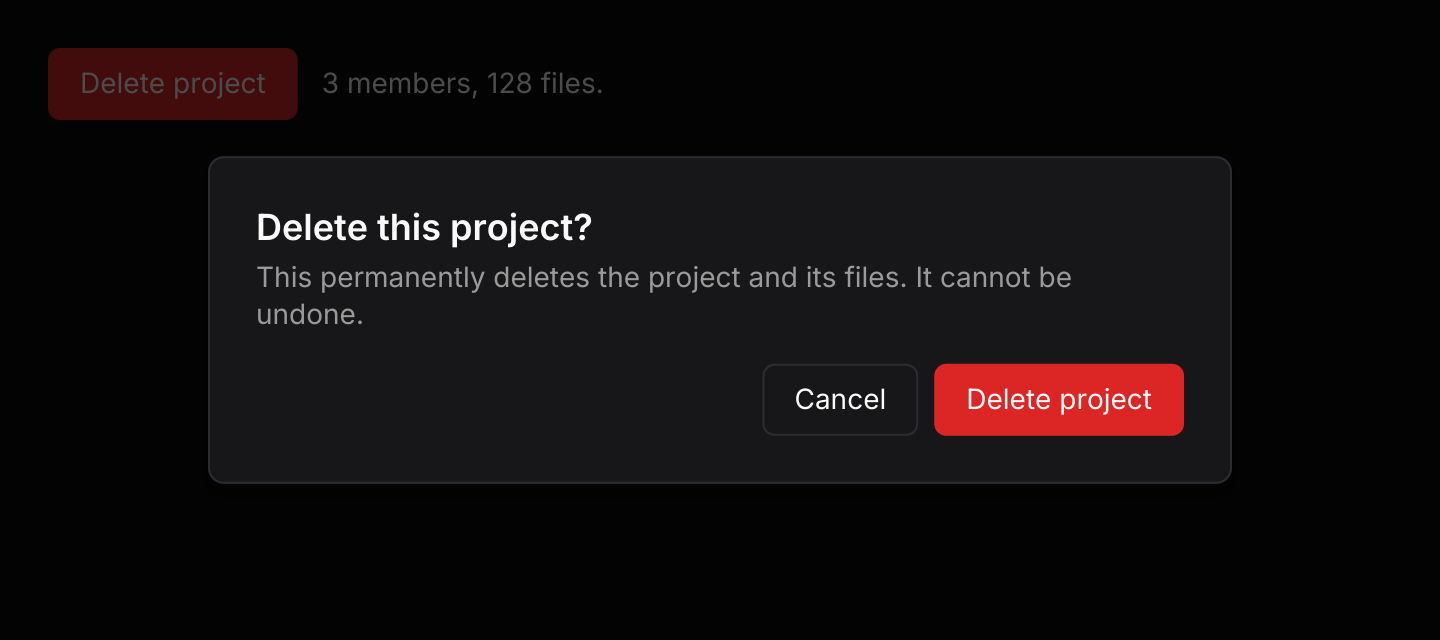
use iced::widget::{container, row, text};
use iced::{Alignment, Element};
use iced_cube::button;
use iced_cube::overlay::dialog::alert_dialog;
use iced_cube::primitives::button::Variant;

#[derive(Debug, Clone)]
pub enum Message {
    Ask,
    Cancel,
    Delete,
}

#[derive(Debug)]
pub struct Example {
    asking: bool,
    deleted: bool,
}

impl Default for Example {
    fn default() -> Self {
        Self {
            asking: true,
            deleted: false,
        }
    }
}

impl Example {
    pub fn update(&mut self, message: Message) {
        match message {
            Message::Ask => self.asking = true,
            Message::Cancel => self.asking = false,
            Message::Delete => {
                self.deleted = true;
                self.asking = false;
            }
        }
    }

    pub fn view(&self) -> Element<'_, Message> {
        let status = if self.deleted {
            "The project was deleted."
        } else {
            "3 members, 128 files."
        };
        let delete = (!self.deleted).then_some(Message::Ask);
        let base = row![
            button("Delete project")
                .variant(Variant::Destructive)
                .on_press_maybe(delete),
            text(status).size(14),
        ]
        .spacing(12)
        .align_y(Alignment::Center);

        alert_dialog(
            container(base).padding(24),
            "Delete this project?",
            "This permanently deletes the project and its files. It cannot be undone.",
        )
        .open(self.asking)
        .confirm("Delete project")
        .on_cancel(Message::Cancel)
        .on_confirm(Message::Delete)
        .into()
    }
}API
| Item | Description |
|---|---|
dialog(base) | Wraps the content the dialog opens over. The dialog stays closed until .open(true). |
.open(bool) | Whether the dialog shows. Your app holds this value. |
.title(text) / .description(text) | The heading, and a line of muted text under it. |
.body(element) | Content between the header and the footer, such as a form. |
.action(element) | Adds a button to the footer, which lines them up on the right. Add the main action last. |
.on_dismiss(message) | Emitted by Escape, a click on the scrim and the close button. Without it the close button renders disabled. |
.on_confirm(message) | Emitted by Enter, through the keymap's Confirm action, usually the same message as the main footer action. Without it Enter does nothing. A field inside that submits on Enter keeps the key. |
.dismiss_on_escape(bool) / .dismiss_on_scrim(bool) | Turns either way of dismissing off. Both default to true. |
.close_button(bool) | Shows or hides the close button in the top right corner. Defaults to true. |
.size(Size) / .width(pixels) | The maximum width: Sm (384), Md (512, the default) or Lg (640). The dialog shrinks to fit smaller windows. |
.keymap(Keymap<Action>) | Replaces the default shortcuts. |
.pass_through(chords) | Chords the open dialog lets through to keys::subscription, such as the shortcut that toggles a command palette. Every other key press stops at the dialog. |
.id(id) | The surface's widget id, which scopes focus. Give nested dialogs different ids. |
alert_dialog(base, title, description) | A confirmation with Cancel and a destructive button. The scrim does not dismiss it and it has no close button. |
.cancel(label) / .confirm(label) | The button labels. They default to Cancel and Continue. |
.on_cancel(message) / .on_confirm(message) | Emitted by the buttons. Escape also cancels unless .dismiss_on_escape(false) is set. |
.confirm_on_enter(bool) | Whether Enter runs the destructive action while no button is focused. Defaults to false, so a stray Enter never destroys anything; keyboard users Tab to the button and press Enter or Space instead. |
dialog:: | The default shortcuts as a Keymap<Action>. Bind, unbind or clear chords to change them. |
action.effect(dismiss_on_escape) | What a resolved Action does to an open dialog: Effect::Dismiss, Effect::Confirm or Effect::Focus(direction). |
dialog:: | The widget id of the close button, for clicking it in tests. |
surface_style(tokens) / scrim_style(tokens) | The surface and scrim styles, for reuse in custom overlays. |
Keyboard
Default shortcuts. Every one can be changed or removed with a keymap; see Keyboard shortcuts.
| Keys | Action |
|---|---|
| Escape | Close Dismisses the dialog, unless Escape dismissal is turned off. |
| Enter | Confirm Sends the dialog's confirm message. An alert dialog's destructive action only runs on Enter when it opts in. |
| Tab | FocusNext Focuses the next text field, or alert dialog button, wrapping from the last to the first. |
| Shift+Tab | FocusPrevious Focuses the previous text field, or alert dialog button, wrapping from the first to the last. |